

Background
Ignition's platform enables financial institutions and banks to create customised client journeys through a white-label experience builder.
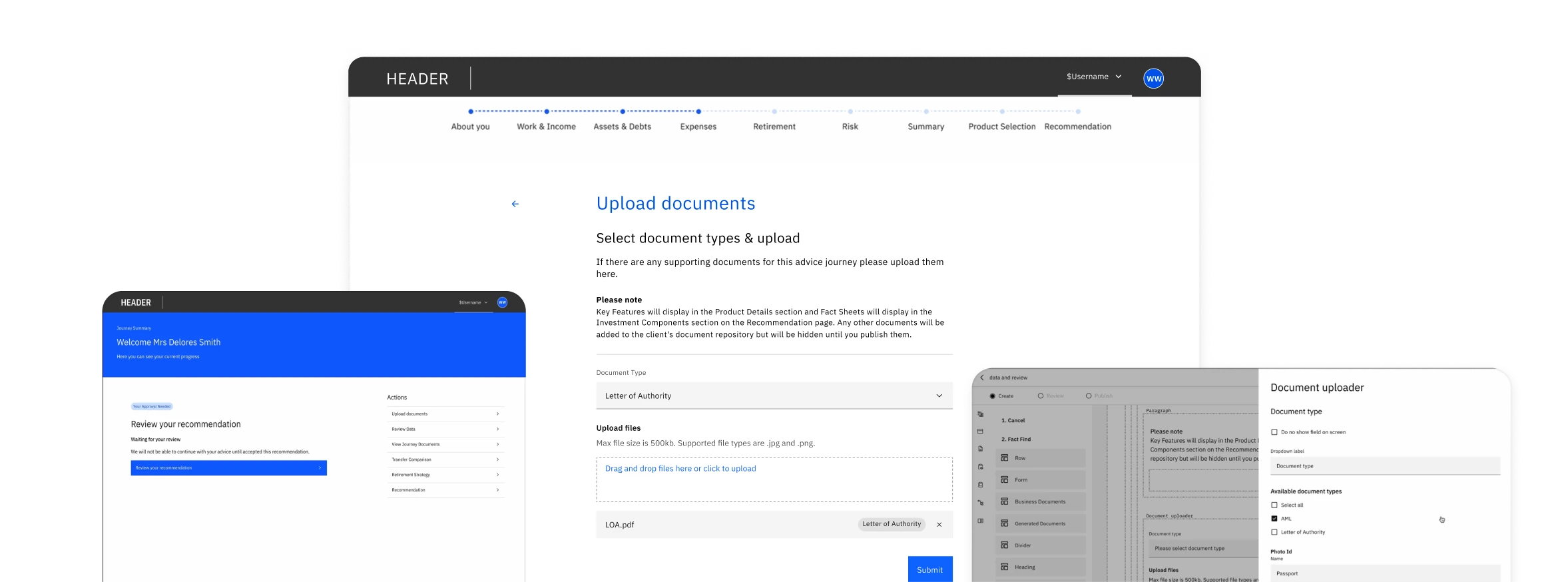
As part of this transition, existing features such as the document uploader needed to be reimagined for the new platform. This feature enables financial advisors to collect necessary paperwork from their clients to support their application. Having already been custom built and validated with three major clients, Ignition wanted to make this capability available across future client implementations.
Part of the challenge was balancing the configuration experience with the client experience, ensuring organisations had the flexibility to customise document journeys while advisors and clients had a simple, intuitive experience.
The Problem
Ignition's existing document uploader allowed financial advisors to collect supporting documentation from clients, such as identity verification documents or proof of address. However, it had been custom-built for specific client implementations and lacked the flexibility required for a scalable white-label platform.
The challenge was creating a configurable document uploader that could support different organisation requirements while maintaining a simple, consistent experience for advisors and clients.
Discovery & Alignment
As this was part of a migration project, the product requirements and user needs had already been established. My focus was understanding the existing functionality, technical constraints, and how the feature needed to evolve within the new platform.
I worked with the Product Owner to review the requirements and understand the intended functionality. Together, we collaborated with the Solutions Architect and Engineering Lead to understand technical limitations and opportunities within the new architecture.
This helped identify key considerations early, including:
- How the uploader would behave across different user journeys.
- How configuration settings would work within the existing Experience Manager framework.
- How to redesign this whilst maintaining feature parity.
Redesigning the broader configuration panel pattern inside the form constructor was out of scope as it had already been established. Therefore my primary focus was on integrating the document uploader into the existing framework while providing the appropriate levers to customise the component.
Defining Our Goals
-
Support multiple upload scenarios
Create a document uploader that could support different workflows, including clients uploading documents themselves, returning to complete a journey later, and advisors uploading on behalf of clients.
-
Keep the user experience simple
Ensure users could easily understand required documents, upload files, remove uploads, and recover from errors throughout the journey and allow single or multiple uploads whilst marking which type of document is being uploaded.
-
Enable configuration flexibility
Allow organisations to define document requirements through the Experience Manager while ensuring the uploader could adapt to different configurations.
-
Maintain platform consistency
Align with existing product patterns and the Carbon Design System to ensure a cohesive experience.
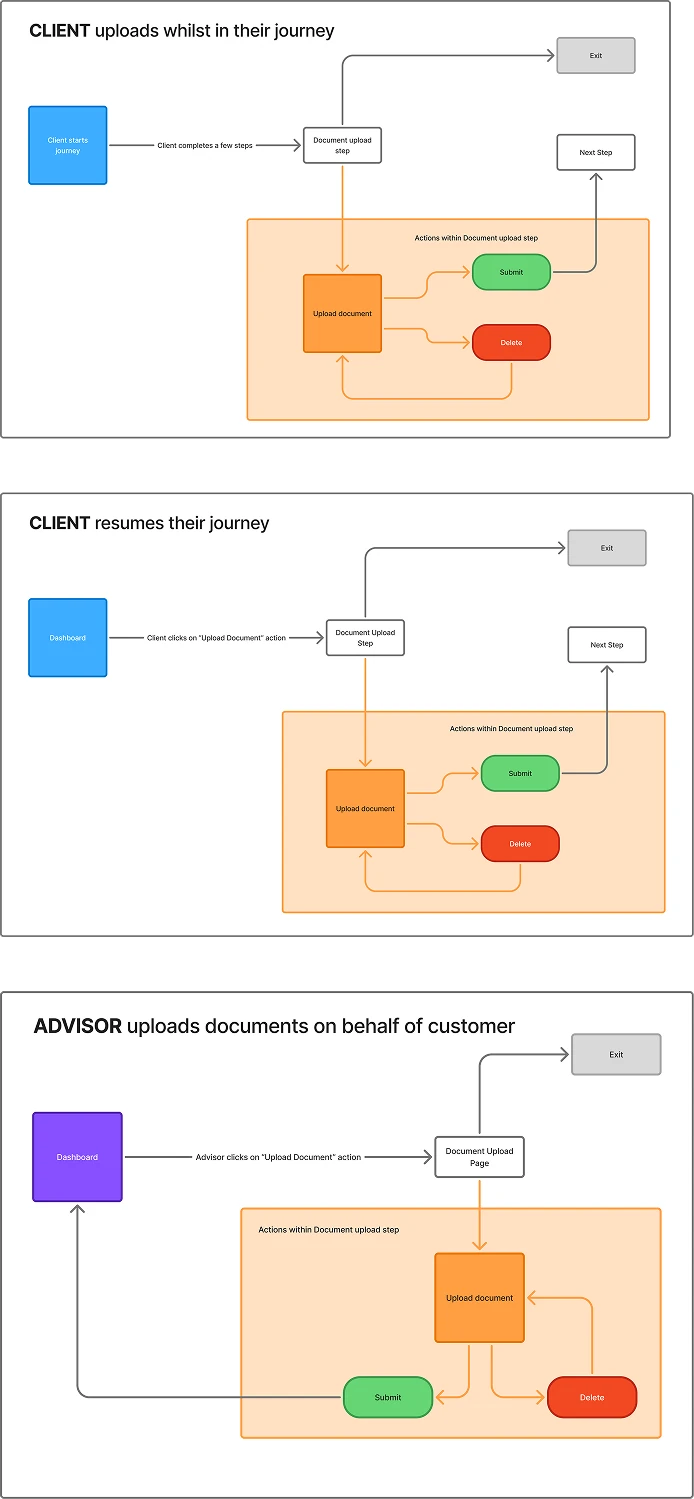
3 Distinct Entry Paths
Synthesising the requirements revealed three key entry pathways that the experience needed to support:
- The Client is asked to upload documents while completing the questionnaire.
- The Client has abandoned the journey and resumes at a later point from their dashboard. They will launch back into the document upload step and will continue to the next question in the flow.
- The Client's Advisor will be asked to upload a document on behalf of the client through the Advisor's dashboard. This would exist outside of the Client's financial questionnaire.
Fleshing Out the Solution
With these in mind I explored several approaches for how users could select, upload, and manage documents.
Some considerations I incorporated into my exploration included:
- Different layouts for document upload options.
- How users would identify uploaded documents.
- How the component could support multiple document types.
Option 1
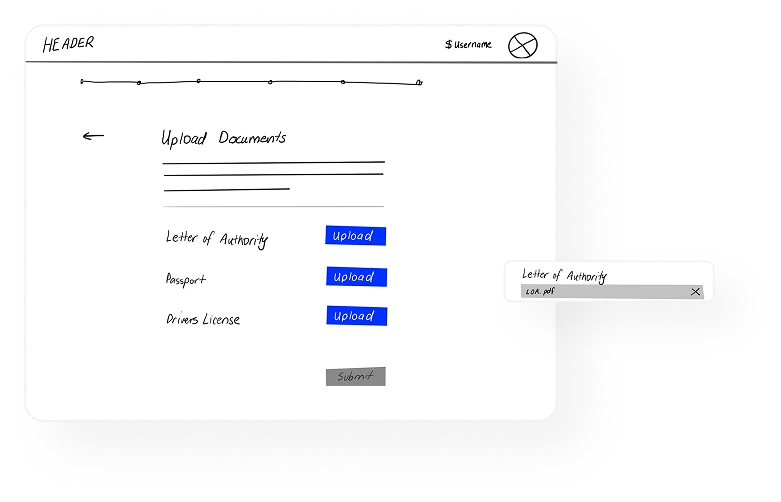
Dedicated sections for different document types
Allows a user to at a glance see which documents have been uploaded.
Option 2
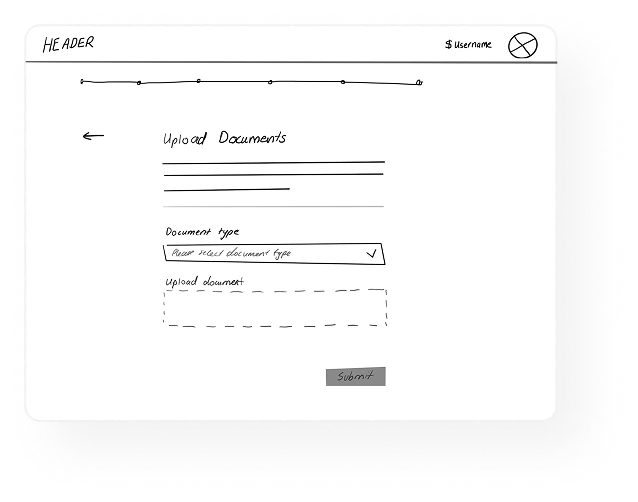
Drop Down to indicate Document type + Upload Carbon component
May be repetitive clicking different document types each time user uploads document. However this option uses 2 Carbon components which would make it a future thinking solution
Option 3
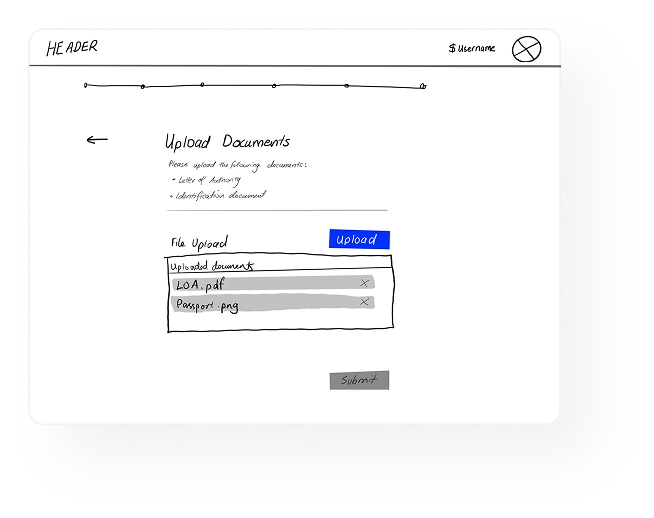
In-line "File upload" component with a container that shows all uploaded documents.
Container would be a custom component and may not be multi-purpose.
Low-fidelity explorations of upload screens
High Fidelity Designs
The result was a flexible component that could support different customer workflows while maintaining a consistent user experience.
Upload document - Within Journey View
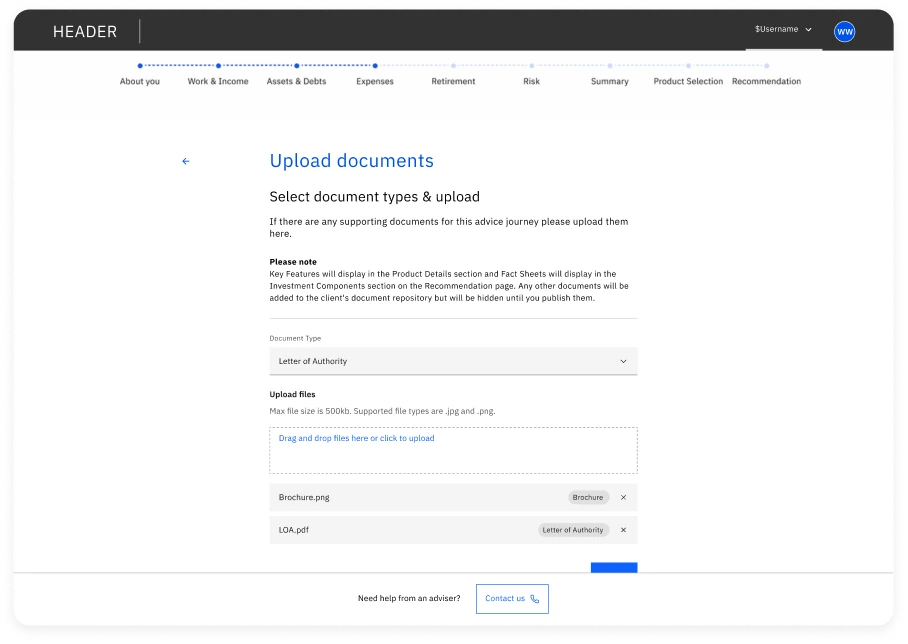
Drop Down Component
When multiple documents required the user is able to specify which document they are uploading.
Upload File (drag & drop) Component
Customised file tile to include Tag component to denote type of document
Document Upload screen
The final solution combined three existing Carbon Design System components. In this way I extended the existing file uploader pattern to support the specific needs of document collection:
- Dropdown component
Allowed users to select the document type they needed to upload. - File uploader component
Provided the upload interaction, validation states, and feedback. - Tag
Allows the system to mark the uploads with the type of document they are.
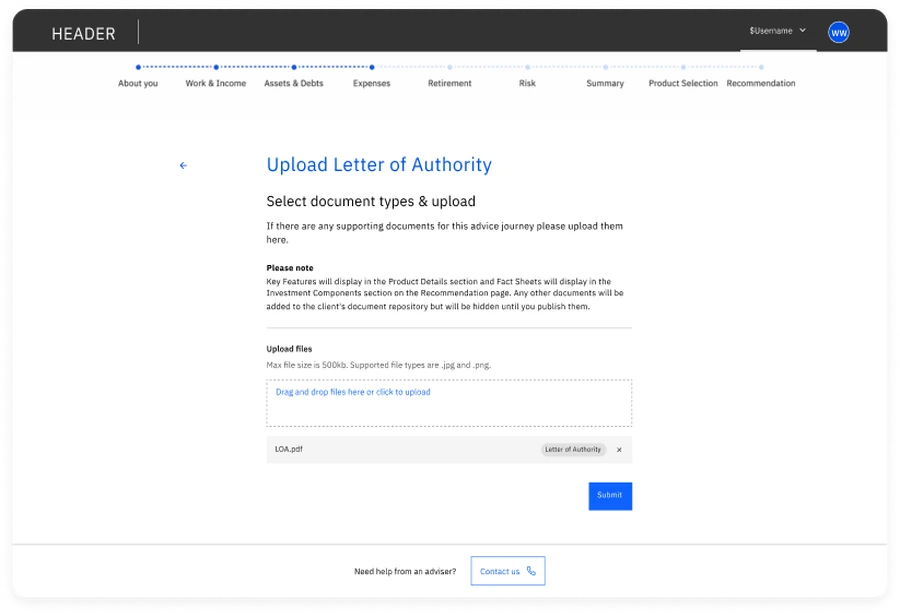
Upload Single vs Multiple documents
I initially explored presenting each required document as its own upload section, as this would make it immediately clear what users needed to provide. However, because document requirements were fully configurable and could vary significantly between organisations, this approach would become increasingly difficult to scale. Instead, I opted for a reusable upload component paired with a document type selector for multi-document scenarios.
While this required users to switch between document types when uploading multiple files it created a robust, reusable pattern that could support a wide range of configurations.
Single Upload
Multiple Upload
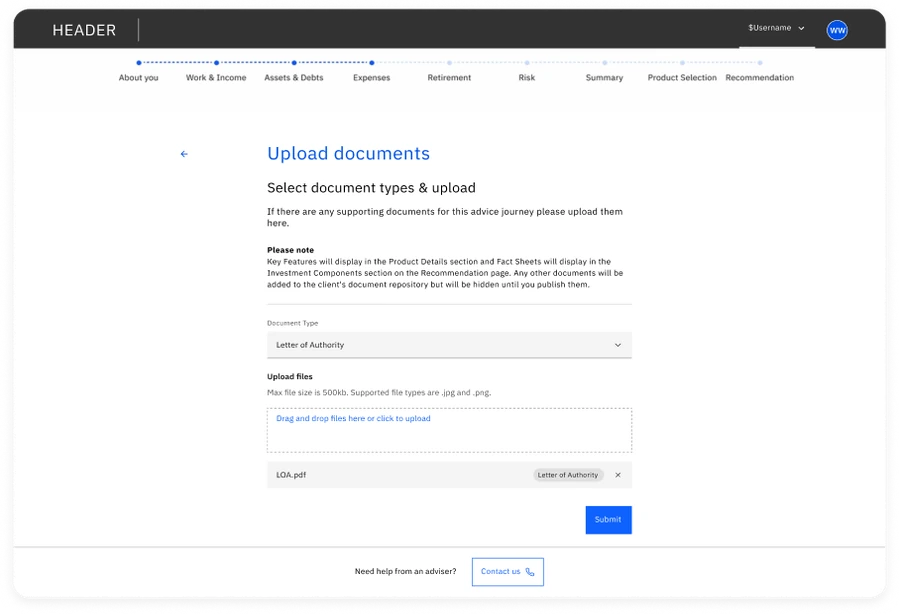
Filled states for single vs multiple document upload.
Resuming a Journey
An important consideration when designing this feature was how the different users would experience it while completing a Journey especially in a non-linear path.
For a client this would be relatively straight forward where the primary action on their dashboard would launch them back into the flow. However an Advisor may not always have permission to access their client's full application journey. Instead, they required a standalone document upload page that provided the same upload functionality without launching the journey.
After uploading documents, advisors were returned to the Journey Summary page instead of using the standard Submit action. This also aligned with the existing journey architecture, where progressing to the next step was reserved for users completing the application themselves.
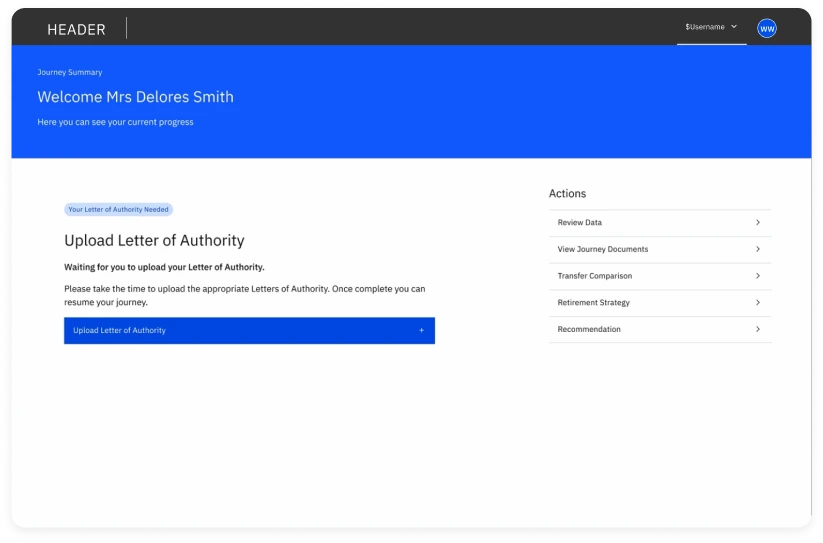
Client Dashboard
Allows Client to return straight to upload step within the Journey
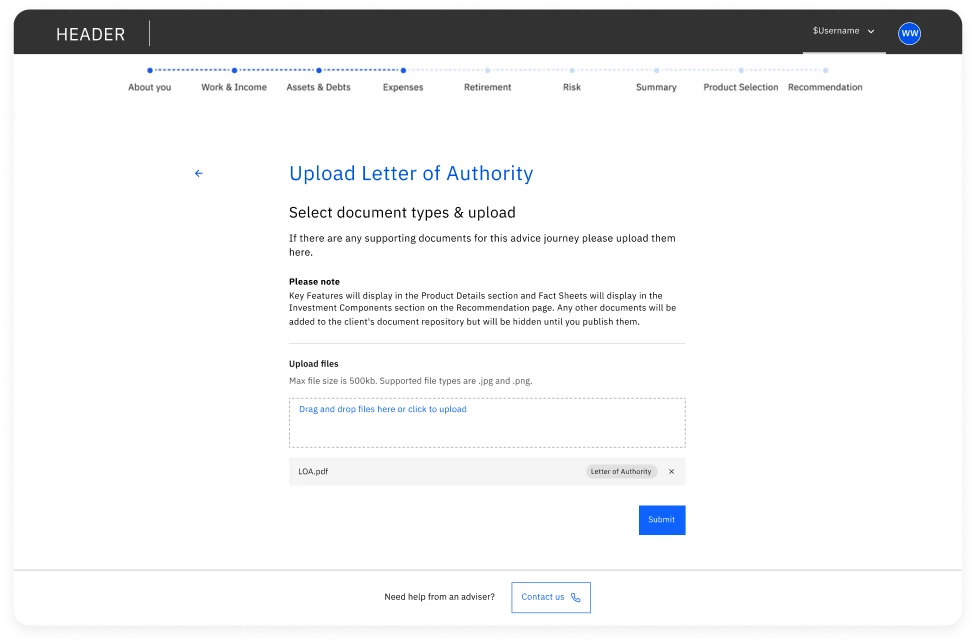
Advisor Dashboard
Allows Advisor to enter this step in isolation.
After upload, Advisors return to the Journey Summary page instead of using the standard Submit action.
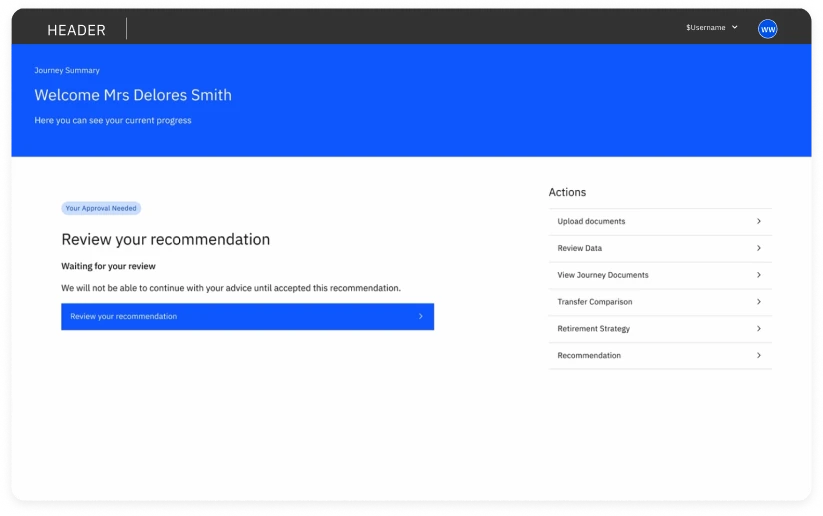
Key screens for resuming a journey
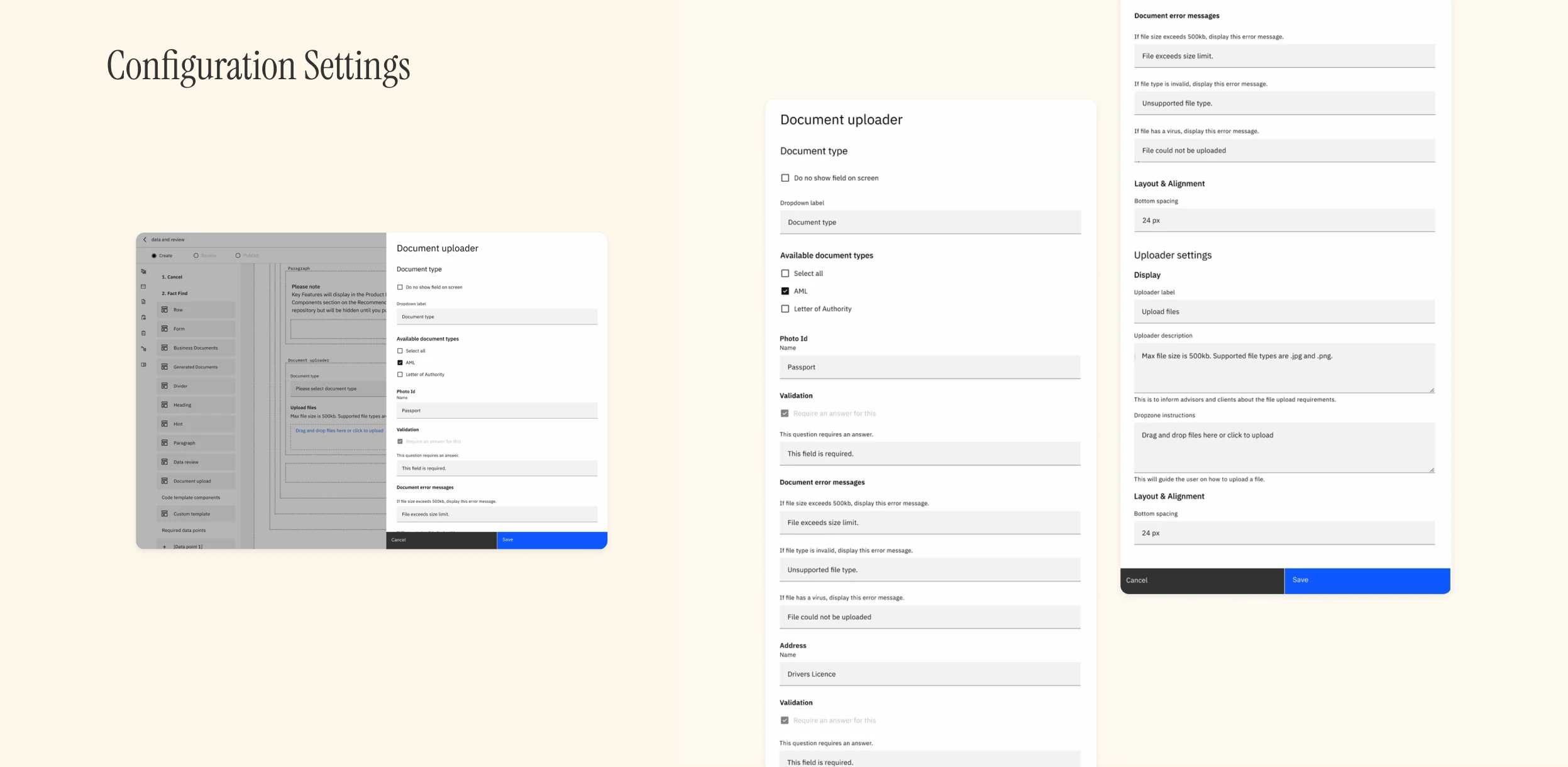
Configuration Settings
For the Journey Builder I used a consistent drag-and-drop interaction, where users select a component, and drop it into their desired location. As the upload document component is closely tied to the document type, they would live together as a bundled component and share configuration settings.
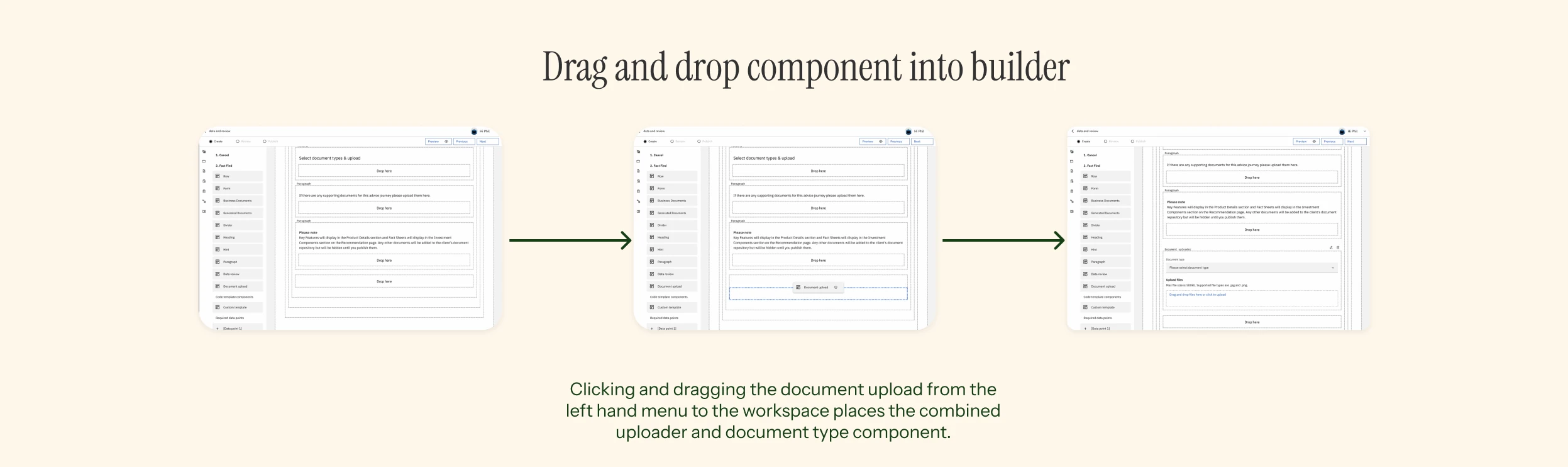
Configuration settings allow a user to:
- specify the type of document type required
- show or hide the document type (depending on if it is a multi-document question)
- tailor copy such as descriptions, headings, error messages (though not tailor the type of errors)
- tailor the bottom spacing
Results & Takeaways
The document uploader was successfully migrated into the new platform architecture while providing a more scalable foundation for future document collection workflows. The solution:
- Created a reusable document collection component.
- Enabled organisations to configure document requirements without engineering involvement.
- Improved clarity for users uploading multiple documents.
- Maintained consistency with the Carbon Design System.
- Balanced business requirements, technical constraints, and user needs.
This project highlighted the importance of designing within complex product ecosystems. The challenge was not simply creating an upload interaction, but aligning multiple stakeholders around a scalable solution that worked across different customer workflows.
By collaborating closely with Product, Engineering, Solutions Architecture, and Sales, I was able to translate existing requirements into a flexible component that supported both current needs and future platform growth.