
Background
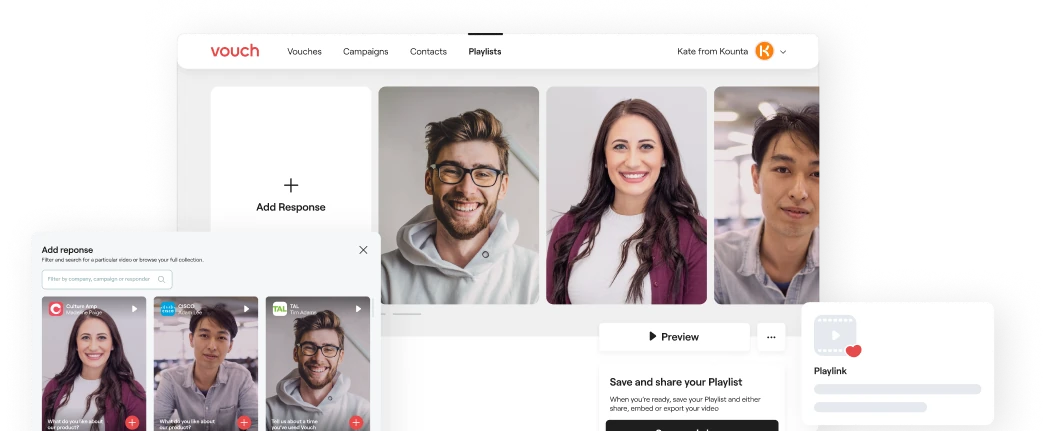
Vouch enables individuals and businesses to collect and share testimonial videos with their potential customers. Having initially found product market fit, they had the objective of expanding their product offering in order to grow their number of users. However they quickly realised that collecting videos was only half the battle.
Once collected these videos bloat up a user's account with raw footage which can only be shared via the original Vouch or Campaign. Concurrently they noticed a portion of users were exporting their videos instead of sharing through Vouch. Therefore Vouch came to us for help to uncover why this was the case and find a way to address it. By doing so they hoped that more users would share through Vouch and boost their chances of organically reaching new audiences.

The Problem
Users were drawn to Vouch because it allowed them to easily collect and share quality video testimonials with their audience. However after sharing their video testimonial these videos would sit in their account, bringing no further value unless exported for the user's private use.
A testimonial once collected had a short shelf life and was unable to generate continuous value for the user.
While the video content itself could stay relevant through careful editing, the original Vouch or Campaign request would become outdated as the user's needs change. Therefore users needed a way to keep deriving value from their collected videos so that they were making the most of their Vouch experience.
...sometimes a video response from a previous Campaign is relevant to what I'm creating now. So I'll download everything and edit it myself.
Understanding the Problem
I conducted research interviews with our primary users to understand their pain points. I synthesised the findings by creating an affinity map and grouped the common themes and pain points of users.
We discovered the following key points:
- 68% of users felt limited by Vouch's editing capabilities. Vouch only provided trimming and transcript editing within individual videos and did not provide a way to customise with brand visuals or other graphics.
- 23% of users wanted the ability to edit together any video regardless if it was part of a Vouch or Campaign so they could create new testimonial videos.
- 74% of users liked that Vouch was easy to use and chose to use Vouch because of this. Therefore any solution needed to prioritise simplicity.
Analysing the Competition
Next I did an analysis of the editing capabilities of Vouch's major competitors with the goal of understanding what the current baseline for video editing features was.
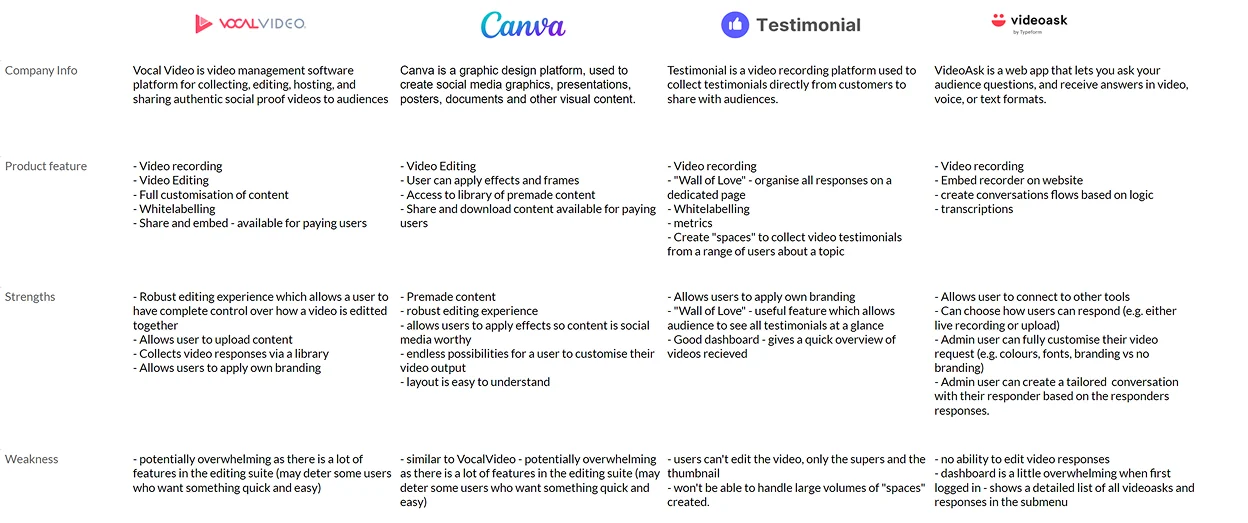
Key takeaways we could apply to Vouch include:
- The use of a library to house collected videos is a good way to quickly pull all relevant content into one place. This would save the user time searching through all their Campaigns and Vouches.
- Some level of customisation features such as using brand colours is a must. When all competitors are offering this feature users then expect this as a basic feature.
- Keeping the UI clean aids greatly in curbing users feeling overwhelmed - this is especially important since this is the big draw card for Vouch's users.
Crystalising User Needs
To solidify our understanding we performed a task analysis using the Jobs-to-be-Done (JTBD) framework. Using this exercise allowed us to extend our understanding of the evolving needs of Vouch's users.
This exercise revealed two key JTBD below.
Job 2
When I have created multiple videos from a Vouch or Campaign.
I want a way to pick and choose videos to create new content.
So I can quickly and easily create new and professional content.
Job 1
When I have created a specific campaign for an event.
I want a way to bring together a short emotive and authentic story/video that brings my customers experience to life.
So I can brag to my audience about my product in an authentic but customer led way.
Defining Our Goals
-
Provide an intuitive way for a user to pull together testimonials from their library of videos.
This would be paramount to ensuring user adoption amongst new and existing users.
-
Give the user the ability to choose any video from their pool of collected videos to reuse.
By doing this it would ensure users don't feel restricted by which videos they can use, therefore improving the user experience.
-
Allow users the ability to elevate their Playlist video with simple graphics and brand colours.
Offering this would help keep user videos within the Vouch ecosystem, ensuring they can continue their organic growth through the sharing of their videos.
Brainstorming a Solution
As a team we brainstormed possible solutions based on our research findings. We came up with 2 options:
Option 1
Allow users to create new videos directly from their Campaigns.
We considered this option because it works with the current architecture of Vouch and conforms with users understanding of how Vouch works. It also requires less build time since it would be added on to their existing Campaigns feature which would allow them to launch faster.
Option 2
Allow users to create new videos through a "Playlist" section.
We considered this option because it would keep the 3 products of Vouch (Vouch, Campaigns and Playlists) distinctly separate ensuring users don't get confused.
Fleshing Out the Solution
I quickly created user flow diagrams following the main success path of the two options to gain early feedback about the direction of the designs from the client and their engineering teams.
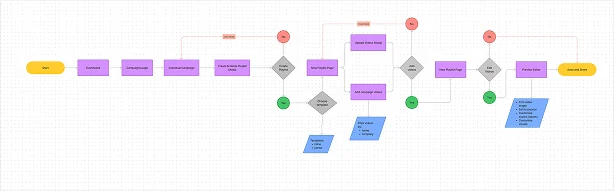
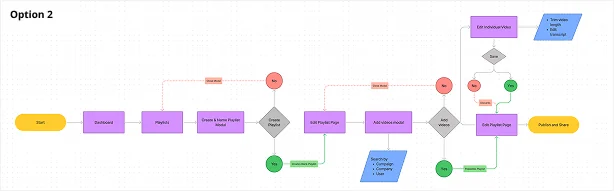
We agreed that Option 2 was the stronger option because of the following reasons:
- Separating Playlist creation and advanced editing as separate tasks was ideal because this minimised cognitive load for users by breaking down the tasks into manageable chunks.
- This option gives users the freedom to use any of their existing videos in their playlist rather than limited to single campaigns.
- From an engineering standpoint it would be easier to build for engineering. By splitting the build for playlists and advanced editing it would reduce the time it would take to launch this feature.
- Lastly this option would keep the interface tidy - videos created in Playlists would live within the Playlist section of the platform rather than getting mixed with Campaigns or Vouches. This ensures that users are easily able to retrieve their Playlists.
Also importantly the clients' engineering team told us that the platforms filtering logic was based off an OR logic. Therefore I needed to keep this in mind going forward when designing how users search for and select videos.
Wireframing the Solution
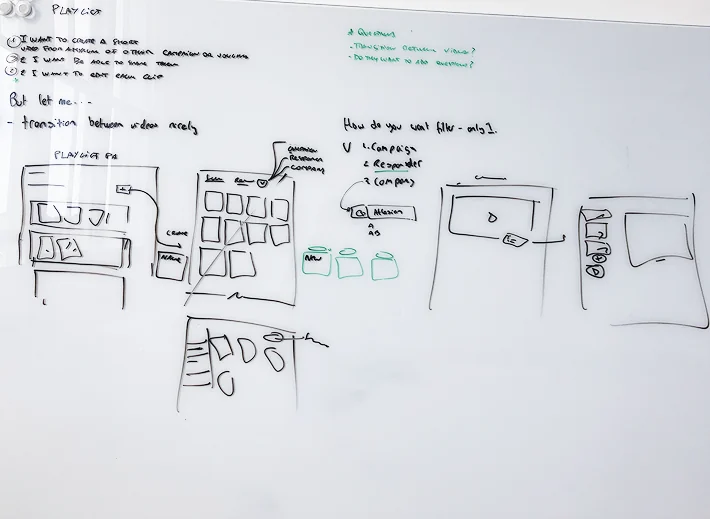
I then sketched out possible options for how the design could look. Since we were mostly leveraging off the look of existing pages, the key pages that required our focus included:
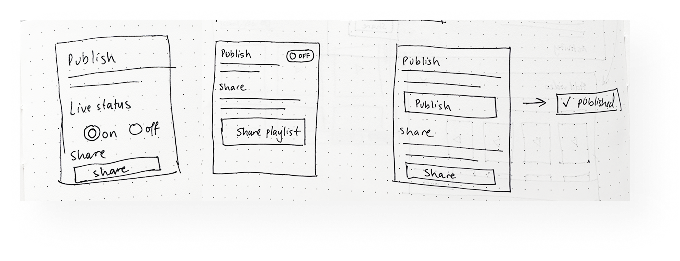
Publishing option
The client wanted to give users the option to publish the Playlist before sharing it. This way if they wanted to quickly remove the video they could unpublish it from within Vouch. After sketching possible ways to visually demonstrate this we decided however that this option was confusing for a user. A better option would be to simply allow users to share their video and manage whether it is live within the respective platforms the video is featured on.
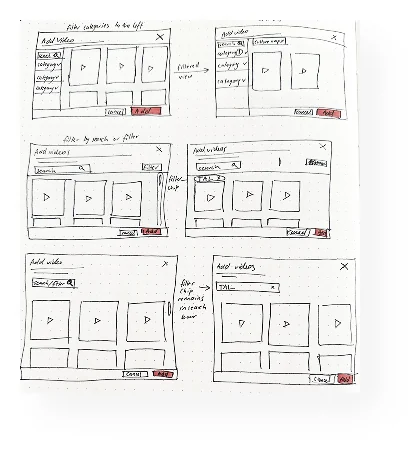
Add videos modal
This modal would introduce the idea of a library of videos a user could search and filter their existing videos. The OR filtering logic meant that users can only filter for one criteria at a time. Therefore my design needed to cater for this.
High Fidelity Designs
I created my high fidelity mockups and prototyped it in Figma. My main focus was on how a blank playlist would be populated by videos whilst still looking and feeling like Vouch's product.
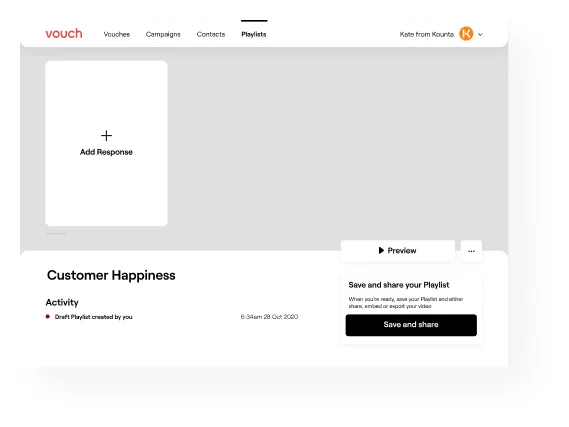
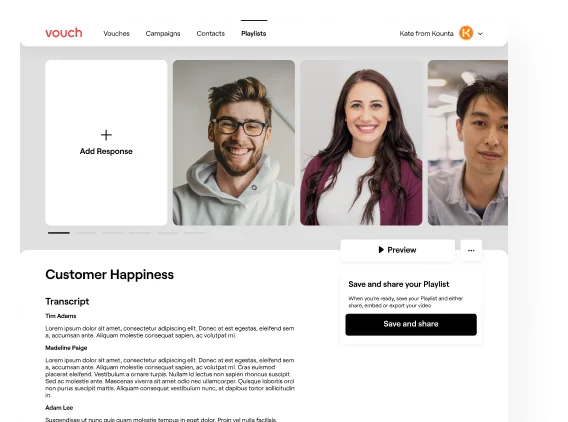
Blank Playlist page
Add a video response modal - this allows a user to select any video on their account.
Once videos have been selected the Playlist page will be populated with transcript and videos.
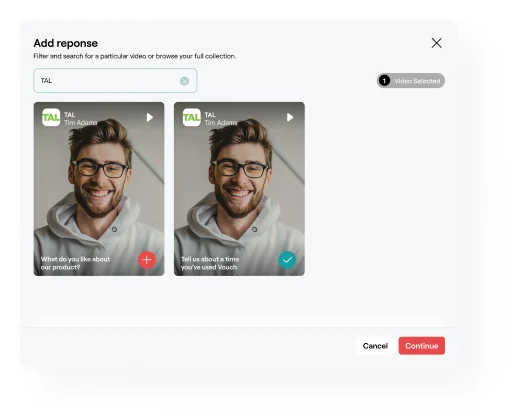
I also paid close attention to how the "Add response" modal would work. It was crucial that a user could see their video collection on Vouch, be able to filter their collection, and be confident that their selected videos would be imported into their Playlist.
Search bar allows the user to filter their collection of videos by campaign, company, vouch and name.
Chip showing the number of videos
When a video is selected the button changes to a tick
I also created custom illustrative icons for the share modal to visually communicate the different options when sharing. These icons use the Vouch logo and add some visual interest to the share modal to capture the user's interest.
We conducted usability testing sessions with our primary users to validate whether the new designs would solve their problems. I created a script asking the user to create a new Playlist using their collected videos and observed how they interacted with Playlist.
These sessions revealed that majority of the users found the process of creating a Playlist intuitive and easy to pick up. They found Playlists a valuable feature and were keen to use it going forward.
Results & Takeaways
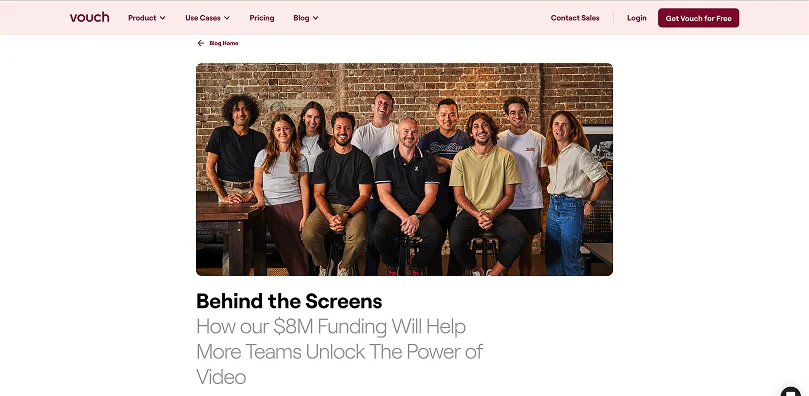
Since implementing Playlists Vouch has seen an increase in the number of users sharing their videos through Vouch's share function and using Playlists to create new videos. Importantly Vouch were able to grow from approximately 800 users to 5000 users by June 2022 as a consequence of implementing Playlist amongst other new features designed by our studio. As a result they secured $8m in seed round funding.
The key lessons I learned from this project were:
- Gain feedback from stakeholders early to nip any problems in the bud. The feedback we received on the user flow helped us to hone in on the best path to take with our solution. This was invaluable for saving time and uncovering any technical limitations before I started designing. Going forward including discussions about technical limitations before I begin research would help to refine the scope of my research before I begin therefore reducing time and keeping insights hyper relevant.
- Design should work hand in hand with engineering to make stronger solutions. Designing for filters was more complex than I initially thought and was an area that we spent some time over. Collaborating with the engineering team helped us to get through this blocker and to design a solution which was technically feasible. In future I would include engineering during my initial research to understand how the backend is set up for key areas that require logic.